Environment Variables (EV) have recently seen an upgrade making them a must have in your project.
Since the early days of Dynamics CRM we had a need for a “config” table. Every project I worked on had a custom built one. The recently revamped Environment Variables are the answer to the config requirement and I’ve been using them heavily on customer projects since they became generally available. With the latest release EVs are natively built into the authoring and solution management experience. They have also been enhanced to be used as store data source parameters in canvas apps and power automate.
Simply put, I LOVE THEM!
This post covers some the use cases I am used EVs for and some of the gotchas I’ve experience that you can easily avoid.
Use Cases
Here are some of the scenarios I have used them for
- To define a data source variables to sharepoint list connetions and mail boxes in canvas apps and flows.
- In model driven apps as configuration data. In my example querying EVs to “switch” newly introduced feature that we have built on/off.
- As a collection of environment specific configuration values within a JSON payload.
Why I love them
I love them because they have been thought through and the new upgrade significantly improves the maker experience especially data source management.
- They are solution aware.
- Define them once and use them across mutiple applications and components (canvas/flow).
- No need for premium licence anymore.
- Natively integrated within the maker experience.
- Have five different data types (including data source).
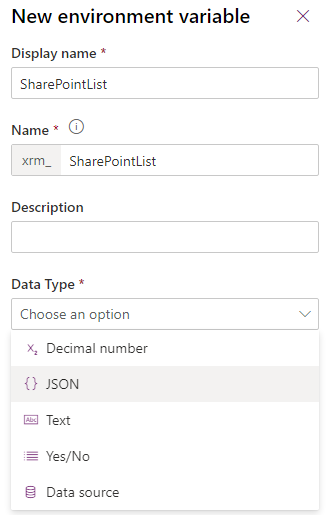
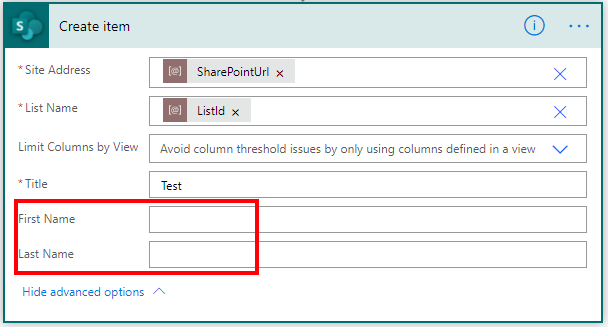
- The Power Automate maker experience is aware of the variable’s value at design time which makes a big difference when compared to “local” variables.
This comes in handy when using EVs to connect to SharePoint and having to know what fields are in a specific list or when connecting to a mailbox and having to know its folder structure to move emails around. If you try it with Power Automate variables you will notice that it doesn’t resolve at design time.
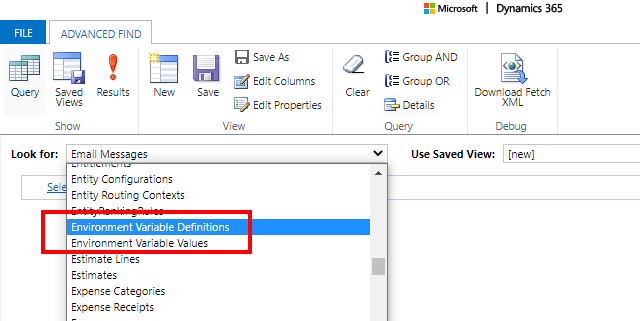
7. They are stored in a Dataverse tables making them security “aware” (user or team owned) and easy to query. It’s interesting to see where they are used and what metadata is associated with the records (e.g. Is Managed).
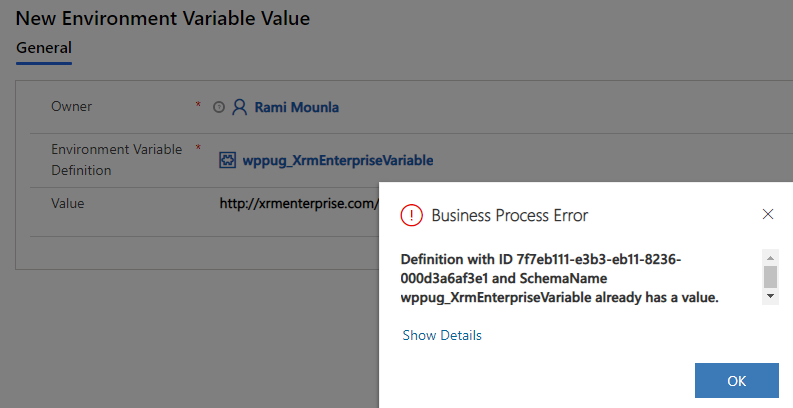
8. They can be updated from within a solution using the maker experience or as a record in Dataverse. The definition includes the default value and has 1:N relation to the value table, however, unlike Azure Key Vault values, the relationhip is 1:1. If you try and add more than one value, an error is displayed due to a unique key constraint.
9. Security access can be controled in security roles using the Custom Entities’ Environment Variable Definition.

10. They are DevOps pipeline friendly (data that can be updated on load and soon using the DevOps Power Platform tools).
Gotchas
To avoid nasty suprises you will have to understand the current limitations
- Not meant for secure data
- As of this writing Microsoft documentation states that
- SharePoint Online is the only currently support “data source” type with Dataverse coming soon.
- EVs within Power Automate triggers currently only supports Dataverse, SharePoint, and SQL.
- If changes within the user interface and not within the ALM process, Power Automate flows will not reflect the new value. Each flow will have to be re-saved or turned off and on again.
- Support in Power Platform Build Tools tasks is not currently available.
- When you add them to a solution you have to choose whether you include the default value or the current value. However, once selected you cannot revise what was originally selected. It always appears as if you included both. You will have to keep track of what was included in the solution especially if you add a current value after creating the variable.
- They pose some challenges when used with managed solutions.
- They are owned by the person that imports them (check 6. and 7. above regarding security access).
Coming Soon
The invest in EVs is on going. Microsoft is working on some enhancements that would come in handy:
- Currently in Power Automate they appear under the heading Parameters, soon they will be renamed to Environment Variables.
- UX enhancement in Power Automate for filtering based on field data types, refreshing list when edited/added in another tab.
- Power Platform Build Tools task to manage data source EVs for better ALM support.
Let me know about your experience using Environment Variables and whether you see room for improvement.